Take 540p Video to 4K — Faithful, Low-Flicker 4× Upscaling
Kandinsky 6 SR ×4 quadruples a video's resolution, so a 960×540 clip becomes 3840×2160. It is a Precision upscaler from Kandinsky Lab: faithful to the source, low flicker, little invented texture. Diffusion-based, distilled to 2 steps per tile. MIT license.
📹 See it in action
Post-workout, in 4K. A hamster in a towel headband, cheeks full, staring into the camera with total seriousness. Filmed at 960×540 and upscaled ×4 to 3840×2160. Default settings, seed 7.
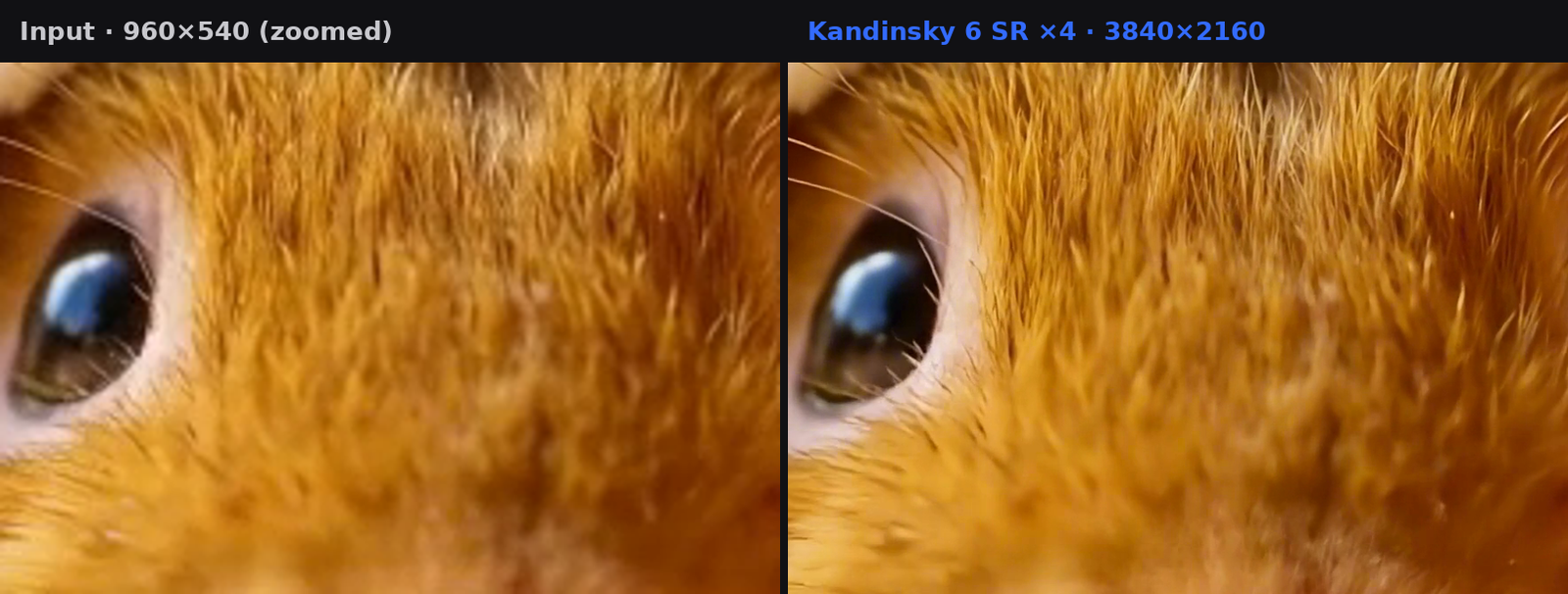
Same frame, same crop. Left: the 540p input, zoomed. Right: Kandinsky 6 SR ×4. Individual hairs and whiskers separate cleanly and the eye keeps its reflection, without new texture being invented. Precision upscalers recover detail; they can't remove motion blur that's already in the source, so a steady shot like this one shows the difference best.
The full upscaled clip (shown here at 1080p to keep the page light). The source clip was generated with LTX-2.5 in CNAPS Studio and downscaled to 540p before upscaling.
What it does
Kandinsky 6 SR ×4 is the 4× entry of the Kandinsky 6.0 video super-resolution model. Give it a clip up to 960×540 and it returns the same clip at exactly 4×, up to 4K.
It keeps the picture close to the original — the right choice when faces, text or products must stay recognizably the same. If you'd rather have the sharpest-looking result and can accept some added texture, use FlashVSR+ Turbo (Creative). For a 1080p source, use Kandinsky 6 SR ×2.
Problem it solves
Use case | How it helps |
Old or low-res footage | 540p clips brought up to 4K in one step |
Brand and product video | Faithful output — labels, logos and faces stay as they were |
Low flicker | Steady frame-to-frame detail, so textures don't shimmer |
AI-generated video | Many video models output ~480–540p; this lifts them to 4K without changing the look |
Input/Output
Input
- Video (required) — up to 960×540 in either orientation, 9–121 frames (about 5 s at 24 fps)
A larger clip such as 1280×720 or 1920×1080 is rejected before it is queued (VIDEO_RESOLUTION_EXCEEDS_LIMIT) — downscale or crop first, or use Kandinsky 6 SR ×2 for 1080p. Clips shorter than 9 or longer than 121 frames are rejected too. In a Batch Run, one clip outside these limits stops the whole node. The output has no audio — add the original sound back with Audio Replace / Mix.
Parameters
Parameter | Details |
scale_factor | Fixed at 4× (read-only). 960×540 → 3840×2160 |
seed | -1 (default) picks a new random seed each run. Set a fixed number to reproduce an earlier result (advanced) |
Output
- Video — exactly 4× the input size, at most 3840×2160 (4K)
Speed
Slow and GPU-heavy: about 13 minutes at the maximum size and length (960×540, 121 frames). For a quick upscale, a preview or a longer clip, use FlashVSR-v1.1 or SeedVR2 3B.
Choosing a video upscaler
What you need | Use |
A 540p source taken to 4K, faithfully, low flicker | Kandinsky 6 SR ×4 (Precision) |
Same, but a clip longer than 5 s (up to 10 s) | RelayVSR (Precision) |
A 1080p source taken to 4K | Kandinsky 6 SR ×2 (Precision) |
The sharpest-looking 4K, extra texture is OK | FlashVSR+ Turbo (Creative) |
A fast upscale or a preview | FlashVSR-v1.1, SeedVR2 3B |
Technical Details
Pipeline | Distilled super-resolution diffusion transformer + KVAE video VAE + latent upscaler bank |
Parameters | SR DiT 1.41B · KVAE 1.74B · latent upscaler bank 3.65B |
Sampling | Distilled with π-Flow to 2 steps per tile (the teacher uses 4) |
Tiling | Tiled diffusion in KVAE latent space |
Scale | 4× (fixed in this node) |
Audio | Video only — source audio is not carried through |
Runtime | GPU, cloud — no local setup |
Developer | Kandinsky Lab |
Compliance & Provenance
Provider | Kandinsky Lab (open weights) |
Provider type | Specialized |
License | MIT |
EU AI Act risk class | Minimal Risk |
Art. 50 transparency | Not applicable |
Region availability | Available globally |
Training data summary | Pending — provider has not yet published per Art. 53(d) |
For more on how we classify models and mark outputs, see our AI Policy.
Model Source
- Hugging Face: https://huggingface.co/kandinskylab/Kandinsky-6.0-VSR-distilled2steps-5s-Diffusers
- GitHub: https://github.com/kandinskylab/kandinsky-6-sr
- Demo: https://huggingface.co/spaces/kandinskylab/Kandinsky-6.0-VSR-Demo
- License: MIT
How Kandinsky 6 SR ×4 compares
Model | Profile | Scale | Max input | Notes |
Kandinsky 6 SR ×4 | Precision | 4× | 960×540, 121 frames | Low flicker; ~13 min at max size |
Kandinsky 6 SR ×2 | Precision | 2× | 1920×1080, 121 frames | Same family, for 1080p sources |
RelayVSR | Precision | 4× | 960×540, 241 frames | Longer clips; ~7 min per full clip |
FlashVSR+ Turbo | Creative | 4× | 960×540, 241 frames | Sharpest; may add texture |
FlashVSR-v1.1 | — | up to 4× | — | Fast streaming upscale |
SeedVR2 3B / 7B | — | up to 4× | — | Upscale + restoration |
Scope notes come from each node's own documentation; the models have not been benchmarked against each other inside CNAPS Studio.
All of these run inside CNAPS Studio — compare them side-by-side with the Video Compare tool.