Document OCR for Skewed, Curved and Camera-Captured Pages
Give it a full page and it maps the layout: where the title, paragraphs, tables and formulas are. Give it one part of the page and it reads it out as text, a table or LaTeX. Works on skewed or curved pages without flattening them first. Made by XingChen-AGI (TeleAI), Apache-2.0. Best on Chinese and English.
What it does
TeleOCR is a small vision-language model made only for reading documents. It works in two steps, and each step is one run of the node:
- Full page in: you get the layout back. One line per region, with its position and type (title, text, table, equation, page number and so on). You get this for a full page whatever the instruction says.
- One region in: crop a paragraph, table or formula from the page, give it the matching instruction, and you get the content: plain text, the table in OTSL format, or the formula in LaTeX.
The developer's own pipeline does the same thing: layout first, then each region is cropped and read. The node gives you the model itself, so cropping the regions is up to you.
The main difference is bent and tilted pages. A phone photo of an open book, a curled receipt or a page shot at an angle usually has to be flattened before OCR. TeleOCR reads it as is. The model card reports results on two warped-document test sets, DocUNet and DIR300.
It is an OCR model, not a chat assistant. It doesn't answer questions about a picture. For questions about an image, use a multimodal language model like Gemma 4 or Qwen3.8.
Languages: trained and benchmarked on Chinese and English.
Problem it solves
Phone photos of documents | Reads skewed, curved or angled pages without flattening them first |
Tables | Keeps rows and columns (OTSL format) instead of one long line of text |
Formulas | Comes back as LaTeX, from papers, textbooks and worksheets |
Page layout | Finds the title, paragraphs, tables, formulas and captions on a page, in reading order |
Same result every time | At default settings the same image gives the same output, useful for batch runs |
Input/Output
- Input: Two ports
- Text: the instruction. These are the ones the developer's code uses:
- Paragraph: "Please output the text content from the image."
- Table: "This is the image of a table. Please output the table in OTSL format."
- Formula: "Please write out the expression of the formula in the image using LaTeX format."
- Full page: "Analyze the image layout."
- Image: a full page or a cropped region (JPG, PNG, WEBP, AVIF). Printed pages, scans or phone photos of documents
- Output: Text
- Full page: the layout, one line per region, like
<box:x1 y1 x2 y2 …><label:title><up> - Region: plain text, a table in OTSL (
<fcel>starts a cell,<nl>ends a row), or a formula in LaTeX
Settings (advanced)
- max_new_tokens: default 1024, enough for a layout map or a normal paragraph. If a long region stops mid-sentence, raise it (up to 8192)
- temperature: default 0. Leave it at 0. Higher values make the model guess at letters where the image is unclear
- top_p / top_k: only matter when temperature is above 0
Choosing an OCR model
Your input | Use |
Chinese or English pages photographed at an angle, curved or warped | TeleOCR |
Japanese documents, including vertical text, tables and formulas | Sarashina2.2-OCR |
Korean, Chinese or English printed text, high volume | PaddleOCR |
Full-page layout understanding, general multi-language documents | GLM-OCR |
Handwriting | DeepSeek OCR |
Example
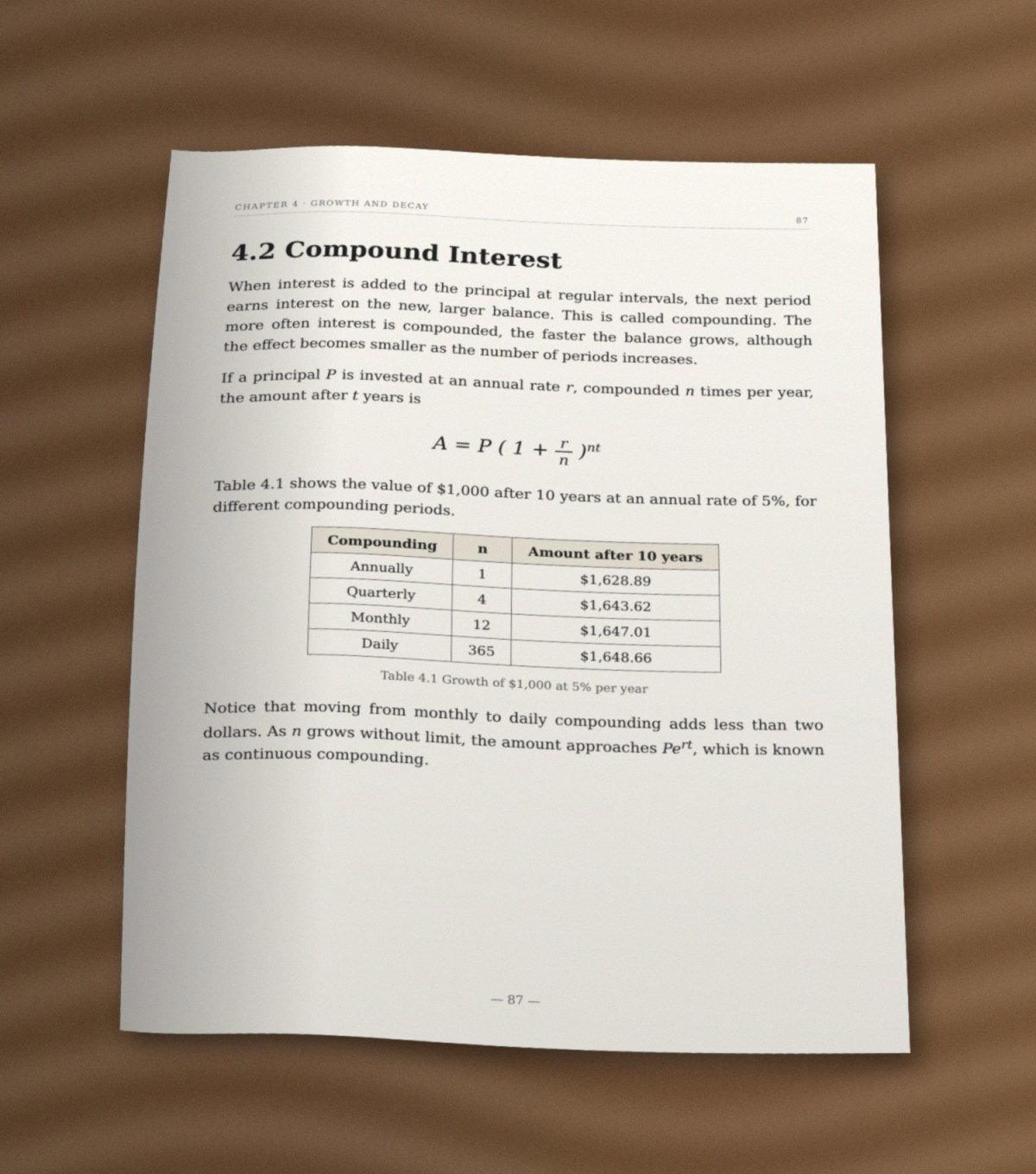
Step 1: full page → layout. A test page we made and warped to look like a phone photo of a curled page.
Prompt
Please output the text content from the image.
TeleOCR output (first 6 of 11 lines)
Even with a text instruction, a full page comes back as layout. The boxes follow the curve of the page.
Step 2: one region → content. The same page, cropped by region.

Prompt: Please output the text content from the image.
Output: "When interest is added to the principal at regular intervals, the next period earns interest on the new, larger balance. This is called compounding. The more often interest is compounded, the faster the balance grows, although the effect becomes smaller as the number of periods increases."
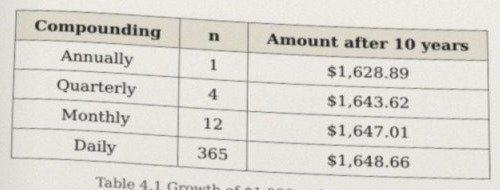
Prompt: This is the image of a table. Please output the table in OTSL format.
Output:
<fcel>Compounding<fcel>n<fcel>Amount after 10 years<nl><fcel>Annually<fcel>1<fcel>$1,628.89<nl><fcel>Quarterly<fcel>4<fcel>$1,643.62<nl><fcel>Monthly<fcel>12<fcel>$1,647.01<nl><fcel>Daily<fcel>365<fcel>$1,648.66<nl>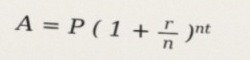
Prompt: Please write out the expression of the formula in the image using LaTeX format.
Output:
$$A=P(1+\frac{r}{n})^{nt}$$Default settings. Outputs shown unedited. All three crops were read correctly.
Performance
- Benchmarks (reported by the developer, full layout + region pipeline): OmniDocBench v1.6 overall 96.87 (table TEDS 97.05, formula CDM 96.36); Wild_OmniDocBench overall 88.53. Both are the top scores in the model card's comparison tables
- Best on: Chinese and English documents with tables and formulas, including phone photos and bent pages
- Watch for: a full page gives you the layout, not the text. To get the text, crop each region and run it again. If a long region gets cut off, raise max_new_tokens
- Not for: Japanese vertical text (use Sarashina2.2-OCR), Korean-heavy volume work (use PaddleOCR), handwriting (use DeepSeek OCR), or open questions about a picture (use a multimodal language model)
Technical Details
Architecture | Compact document-parsing VLM built on Qwen2.5-VL (about 1.2B parameters per the model card) |
Developer | XingChen-AGI (TeleAI) |
Languages | Chinese, English |
Structure recovery | Layout (region boxes and types), text, tables (OTSL) and formulas (LaTeX), also on bent pages |
Runtime | Cloud GPU, nothing to install |
Compliance & Provenance
Provider | XingChen-AGI (TeleAI) |
Provider type | Specialized |
License | Apache-2.0 |
EU AI Act risk class | Minimal Risk |
Art. 50 transparency | OCR output is labeled "AI-extracted", not "AI-generated" |
Region availability | Available globally |
Training data summary | Pending — provider has not yet published per Art. 53(d) |
For more on how we classify models and mark outputs, see our AI Policy.
Model Source
- Model card
- License: Apache-2.0
How TeleOCR compares
CNAPS Studio has five OCR models. The main differences are language and how much of the page layout they keep.
Model | Best for | Notes |
DeepSeekOCR | Multilingual documents and handwriting; markdown output | Vision-language model |
GLM-OCR | Tables, formulas, and structured extraction | 0.9B; OmniDocBench v1.5 94.62 |
PaddleOCR | Printed text in photos — menus, signs, IDs, screenshots | One language per node: KO / JA / ZH / EN |
Sarashina2.2-OCR | Japanese documents, including vertical text | Tables as HTML, formulas as LaTeX; 7–20 s per page |
TeleOCR | Skewed, curved, or camera-captured pages | Layout per page, then text / OTSL / LaTeX per region; ~1.2B |
In short: PaddleOCR for short printed text in photos, GLM-OCR for full documents with tables and formulas in one run, TeleOCR for bent or tilted pages when you can read them region by region, Sarashina2.2-OCR for Japanese, DeepSeekOCR for mixed-language pages and handwriting. The notes come from each node's own docs. We haven't benchmarked these models against each other in CNAPS Studio.
All of these run in CNAPS Studio, so you can try them side by side.